First VPN connection fails on iPhone
The very first tap on connect fails. Almost always one of three gates: the VPN permission, your account not live yet, or the line list still loading.
You have just installed the app, the very first tap on connect fails, and the natural conclusion is that something is broken. Failing on the first connection is a different class of problem from failing after weeks of normal use, and it has a much shorter list of causes. Three of them cover almost everything, and each takes under a minute to recognise.
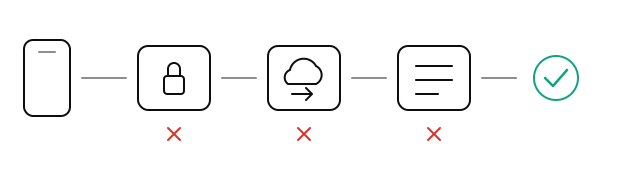
The first connection passes three gates in order: the system's permission to add a VPN configuration, your account becoming live on the servers, and the app fetching the line list. Each of the three failures stops at a different gate, and the app words its message differently for each. Read the message and you already know which one you have.
1. The VPN configuration permission was never granted
Any app that installs a VPN configuration on iOS has to ask you once. The first time you tap connect, iOS shows a prompt asking to add a VPN configuration, and you have to allow it. On some models it also asks for your passcode or Face ID.
The thing to know about that prompt is that it comes once per configuration. If you tapped Don't Allow, or a notification covered it and you dismissed it by accident, tapping connect afterwards can appear to do nothing at all. That is not a dead end. When the app recognises this state it tells you that you need to allow it on the iPhone and shows a Try Again button, which removes the unauthorised configuration and creates a fresh one, so the system asks you again.
To confirm from the system side, open Settings, General, and find the VPN row. Depending on your iOS version and whether this device has ever had a configuration profile, it is called VPN & Device Management, or simply VPN. Look for Nono VPN in the list. If it is not there, the configuration is not currently installed, either because it never got added or because it was removed. Either way the fix is the same: go back to the app and tap Try Again.
2. Your account is not live on that server yet
The message for this one says your account is not active on this server yet, and it tells you that switching lines will not help. That part is worth believing.
A newly created account has to propagate to the nodes. That happens automatically in the background and normally finishes well inside a minute. If you tap connect during that window, the server does not know you yet and refuses. Switching lines does nothing here, because you are not on any of the others either.
So the whole fix is: wait ten or fifteen seconds, then tap connect again. If you are still seeing the same message after three minutes, waiting is no longer the answer. Contact support, because we can see the sync state of an account from our side and you cannot.
3. You tapped connect before the line list arrived
On launch, the app fetches the current list of lines. On a slow network, or right when the phone is changing networks, that takes a few seconds. During it you may see the app say it is preparing lines, that there is currently no network, or that it could not reach the service and is retrying.
None of those are connection failures. They are the app saying it has not reached the point of connecting yet, and which one you get depends on the network at that moment. Waiting is faster than tapping.
If it settles on repeated failures to reach the service, check whether the network itself works: disconnect the VPN and open any web page in Safari. If nothing loads, the problem is the network rather than the app. If pages load and the app still cannot fetch, pull down to refresh.
Two rarer ones
- A message saying the problem is on your device and switching lines will not help. Something is stuck at the system layer, and the app cannot see what. Quit the app completely and reopen it, which usually clears it.
- A message saying the configuration could not be read. The app files this one on our side. Pull to refresh, and if it persists, contact support and include the wording you saw.
A one-minute checklist
- Settings, General, the VPN row: is Nono VPN listed? If not, you did not get past the permission gate.
- Read the exact wording the app gave you. The three cases above are worded differently on purpose.
- If the message says switching lines will not help, stop switching lines. Wait fifteen seconds and tap connect again.
- If none of the three fit, disconnect the VPN and check in a browser whether the network itself works.
When you write to support, copy the message across word for word. Those messages are written separately for each cause, so one line of it narrows the problem to a specific layer.
Frequently asked
I tap connect the first time and nothing happens at all.
It says my account is not live on this server yet. Should I switch lines?
Am I just tapping connect too soon after opening the app?
Related articles
- VPN connected but no internet on iPhoneVPN shows connected on iPhone, but nothing loads? Check Wi-Fi login pages, switch lines, review Low Power Mode, reset DNS, and remove profile conflicts.
- VPN stalls after switching Wi-Fi or cellularStill says connected after you leave the house, but nothing loads. How long to wait, what the tunnel does in those seconds, and when waiting will not help.
- How to download a VPN in China on iPhoneThe App Store works in China, but results depend on your Apple ID region. Here's what you can do after arriving and what to prepare before your next trip.
Written by the Nono VPN team with AI assistance, and checked by a person before publishing.