VPN stalls after switching Wi-Fi or cellular
Still says connected after you leave the house, but nothing loads. How long to wait, what the tunnel does in those seconds, and when waiting will not help.
You walk out of the house, the phone hands over from Wi-Fi to cellular, and by the time you look at it the status is still green but Safari is doing nothing. This is a different problem from not being able to connect at all, and it wants a different response. Most of the time it clears on its own within about fifteen seconds. Three cases do not, and those are worth recognising.
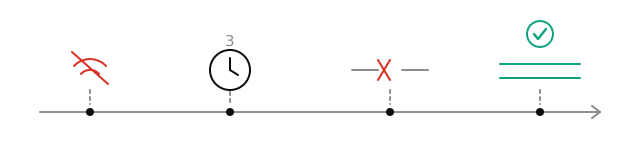
That is the whole of those fifteen seconds. The network changes, the tunnel waits three seconds before believing it, then it tears down the connections that will not recover by themselves, and the next thing that needs to send data rebuilds them on the new network. What you experience is the short pause in the middle.
What the tunnel is doing while you wait
The tunnel watches the network path continuously. When it sees that there is no usable route, it does not immediately decide you are offline. It waits three seconds and checks again. Doorways, lift lobbies, train platforms and the edge of coverage produce sub-second flickers all the time, and a tunnel that dropped on every flicker would be worse to live with than one that pauses.
Once the change is confirmed, connections that cannot recover on their own are torn down. Connections are made on demand anyway, so after the teardown the next time an app needs the network, the connection it gets is one made on the new network. That is simpler than maintaining a reconnection state machine, and there is less to get wrong. The normal experience, therefore, is a short pause followed by everything working.
How long to give it
Ten to fifteen seconds. Rather than watching the status light, which cannot tell you any more than it already has, open a page you use often. The moment data starts moving, it has recovered.
If nothing has moved after fifteen seconds, one of the three cases below applies.
Case one: the new network wants you to sign in first
Hotels, airports, cafés, trains and guest networks usually let the phone join and then block everything until you accept terms or enter a room number on a page of their own. Until that is done, such a network usually passes little beyond its own sign-in page, and the tunnel cannot come up through it. This has nothing to do with the network change as such. You just walked into it at the same moment.
Disconnect, open Safari, and go to any plain http address. If you are redirected to a sign-in page, that was it. Complete it, then connect again. When the app recognises this kind of network it tells you directly that you need to sign in through the browser first, and that is the thing to do before testing anything else.
Case two: the new network does not get on with the line you are using
Same phone, same line: fast on your home broadband, and then on some mobile networks or some corporate networks it will not come up at all. Usually the line itself is fine, and the difference is in how that particular network handles the kind of traffic the line uses. Waiting longer does not usually change it.
Open the line list and pick a different one, ideally of a different type. The app keeps a record per network of how each line behaved on it, so when you come back to the same network it starts from what worked there before. Getting it right by hand once in each of the few places you visit often is usually all the effort this ever needs.
Case three: a long spell locked, or Low Power Mode
If the phone has been sitting untouched for a long time, especially with Low Power Mode limiting background activity, the tunnel gets less time to run along with everything else in the background. You unlock, it still looks connected, and data takes a while to catch up. Going by the reports we get, this comes up less often with Low Power Mode off. That mode has other effects on VPN tunnels too, covered in why iOS silently kills your VPN.
To recover immediately, tap the power button to disconnect and tap it again to connect. That is faster than reinstalling or restarting, and it loses nothing.
Three things not to do
- Do not restart the phone. What a restart eventually does is disconnect and reconnect. It just takes the long way around.
- Do not delete and reinstall. That clears the line preferences this device has built up and the local cache, and it does not touch any of the three causes above.
- Do not work through the line list one by one. Decide which of the three cases you have first. When it really is the line, one switch is usually enough. When it is not, working through the list tells you very little.
If it keeps happening
One network that reliably breaks when you move to it and recovers when you move back is worth telling us about. In the app, open Settings and contact support with three things: which two networks you are moving between, how long you waited after the change, and whether switching lines helped. Those three save a full round of questions.
Frequently asked
How long should I wait before deciding something is wrong?
Why is the status still green when no data is going through?
Do lifts and underground stations break the connection?
Related articles
- VPN connected but no internet on iPhoneVPN shows connected on iPhone, but nothing loads? Check Wi-Fi login pages, switch lines, review Low Power Mode, reset DNS, and remove profile conflicts.
- Low Power Mode and VPN disconnects on iPhoneLow Power Mode gets blamed for VPN drops on iPhone, but it does not switch the tunnel off. What does: app offloading, Wi-Fi Assist and per-app cellular data.
- Telegram notifications not working with VPNTelegram silent on iPhone until you open it? Tell a missing banner apart from a stalled connection, then check permission, Focus and Scheduled Summary.
Written by the Nono VPN team with AI assistance, and checked by a person before publishing.